Bot roster last verified against OpenAI, Anthropic, Google, Meta and Apple crawler docs: October 21, 2026. This page gets re-checked when the roster moves.
Last month’s access logs on our own site told the usual 2026 story: ByteDance’s Bytespider hammering pages in bursts, Common Crawl sweeping through quietly, OpenAI and Anthropic bots pulling content on their schedules. Multiply by every site you run, and AI scraping stops being abstract: it’s server load, bandwidth, and your work feeding models that owe you nothing.
The temptation is to slam the door, and that’s where sites get hurt: one careless line in robots.txt and you’ve blocked Googlebot too, which de-indexes you from the only machine still sending traffic. I’ve been handed exactly that cleanup twice this year, both times a well-meaning “block the bots” edit that nuked search.
So here’s the file we actually deploy: block the training scrapers, keep Google and the live search bots, with the copy-paste rules, the two bots everyone mislabels, and the honest part about which crawlers ignore robots.txt entirely.
- Check your access logs first to see which AI bots actually hit your server.
- Block training bots like GPTBot, ClaudeBot, CCBot and Bytespider by name in robots.txt.
- Keep search bots like OAI-SearchBot, ChatGPT-User and Googlebot allowed, or you lose AI search citations.
- Never use a wildcard “User-agent: *” with “Disallow: /”. It blocks Google too.
- Robots.txt is a request, not a wall. Add Cloudflare AI Crawl Control or firewall rules for bots that ignore it.
AI companies run two different kinds of bot, and the whole game is telling them apart:
- Training crawlers (safe to block): GPTBot, ClaudeBot, Bytespider, CCBot harvest content to train future models. Blocking them has zero effect on Google rankings
- Live search and fetch bots (block at your peril): OAI-SearchBot powers ChatGPT Search citations, PerplexityBot indexes for Perplexity’s answers, and user-triggered fetchers (ChatGPT-User, Perplexity-User, Meta-ExternalFetcher) grab pages when a real person’s question needs them. Blocking these deletes you from the AI answers that send referral traffic, the ones we work to get indexed in
First, pull your own numbers (two minutes)
Before writing rules, see who’s actually eating your server. One line against your access log counts hits per AI bot:
grep -iE "GPTBot|ClaudeBot|Bytespider|CCBot|OAI-SearchBot|Meta-External|PerplexityBot|Google-Extended" access.log | awk '{print $12}' | sort | uniq -c | sort -rnA seven-day slice from one of our own servers looked like this (your mix will differ, which is the point of running it): Bytespider in the thousands of requests, arriving in bursts; CCBot and the training crawlers in the hundreds, steady; OAI-SearchBot and the user-fetchers in the dozens. The takers outnumber the citers by orders of magnitude, and that ratio is what the file below prices in. Screenshot your counts before and after; it’s the most honest before/after this job produces.
The copy-paste robots.txt blocklist
Add this to yourdomain.com/robots.txt to block the major training scrapers while preserving Google and live-search visibility:
# =========================================================
# BLOCK AI TRAINING SCRAPERS (does not touch Google Search)
# =========================================================

# OpenAI model training
User-agent: GPTBot
Disallow: /

# Anthropic model training
User-agent: ClaudeBot
Disallow: /

# Anthropic legacy token (harmless belt-and-braces)
User-agent: anthropic-ai
Disallow: /

# ByteDance / TikTok scraper (aggressive)
User-agent: Bytespider
Disallow: /

# Common Crawl dataset collector
User-agent: CCBot
Disallow: /

# Meta AI training
User-agent: Meta-ExternalAgent
Disallow: /

# Apple AI training opt-out (Applebot search is separate)
User-agent: Applebot-Extended
Disallow: /

# Google Gemini training opt-out (does NOT affect Google Search)
User-agent: Google-Extended
Disallow: /

# =========================================================
# LIVE SEARCH + USER FETCH BOTS: leave these ALONE
# (no Disallow lines needed; listed for clarity)
# Googlebot, OAI-SearchBot, ChatGPT-User,
# Claude-SearchBot, Claude-User,
# PerplexityBot, Perplexity-User, Meta-ExternalFetcher
# =========================================================
User-agent: OAI-SearchBot
Allow: /

# Explicit default: everyone not named above stays allowed
User-agent: *
Allow: /
One deliberate choice to understand: Perplexity’s and Meta’s fetchers aren’t in the blocklist because they’re NOT training bots, despite half the copy-paste lists online filing them there; OpenAI’s own crawler documentation draws the same training-vs-search line for its three bots. PerplexityBot indexes for Perplexity’s search answers (block it and you vanish from those citations), and Meta-ExternalFetcher performs user-initiated link fetches. Blocking either costs visibility and saves you nothing on training.
Same policy, two more switches
Robots.txt is the universal method, but the identical block-training-keep-search policy can be applied from two other places, and for many sites the right answer is stacking them:
Cloudflare AI Crawl Control
If your domain runs through Cloudflare: dashboard → your zone → AI Crawl Control, where training crawlers can be disallowed as a preset or individually while search crawlers stay allowed. Two things make this layer worth having even with a perfect robots.txt: it ENFORCES (a blocked bot gets refused, consent not requested), and Cloudflare’s newer controls address the mixed-use problem, crawlers that serve both search and training, at the network level. New Cloudflare zones ship with AI-crawler blocking on by default now; if you WANT the search citers in, check this screen rather than assuming. One honest limit from Cloudflare’s own docs: on the free plan, detection leans on user-agent strings, so disguised bots can still slip the net, which is exactly what the log-verification step below exists for.
WordPress plugin toggles
Yoast SEO ships a crawl-optimization setting that blocks the common AI training crawlers with a toggle; Rank Math gives you direct robots.txt editing (General Settings → Edit robots.txt, our setup), which is where the file above gets pasted. Either way the plugin is writing the same rules this article hand-writes, so after enabling anything, curl your live robots.txt and read what actually shipped. In audits we regularly find a plugin toggle and a physical robots.txt file quietly fighting each other; one source of truth, always.
Google built Google-Extended precisely so you can refuse Gemini training and grounding uses outside Search: disallowing it does NOT affect indexing, rankings, or AI Overviews, which run on Googlebot. One extra nuance from our own setup notes: AI Overviews inclusion has its own separate switch too, the “Search generative AI” setting in Search Console, which we covered in the opt-out guide. Robots.txt controls training; Search Console controls AI-answer appearance; neither touches blue links.
The two mistakes that actually hurt sites
User-agent: * followed by Disallow: / blocks EVERYTHING, Googlebot, Bingbot, the lot, and Google proceeds to forget you exist. Both cleanup jobs I mentioned started exactly here: someone pasted a “block AI” snippet with a wildcard in it. Specific user agents only, always.
Robots.txt is a request, not a wall: the big vendors document compliance (and in our logs, OpenAI, Anthropic and Google do honor it), but new scrapers, spoofed agents and at least one prominent AI company caught stealth-crawling past robots directives prove the polite layer isn’t the whole defense. The working stack is both: robots.txt for the compliant majority, plus your WAF (Cloudflare’s AI Crawl Control, which blocks AI crawlers by default on new zones) for everything that doesn’t ask. Write the file anyway, it’s also your legal paper trail of refused consent. And know what no method does: nothing here is retroactive, content already collected sits in yesterday’s training sets regardless.
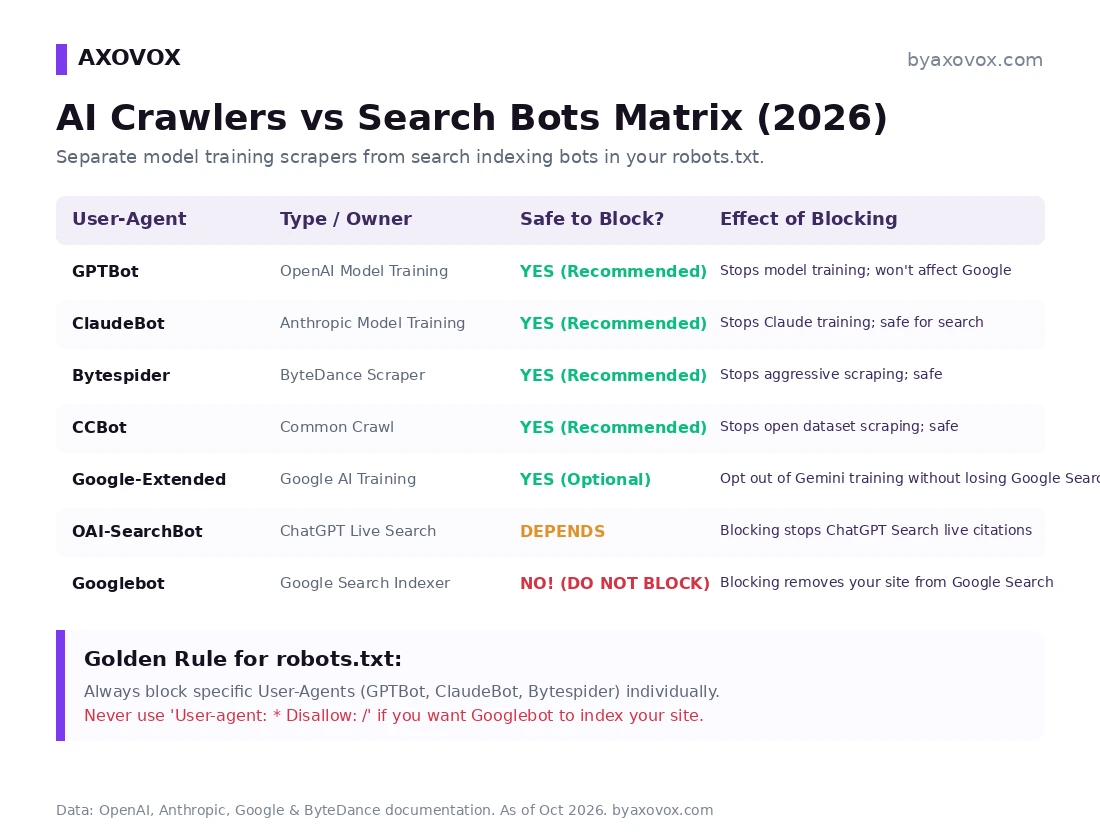
The 2026 user-agent cheat table
| User-agent | Company | What it does | Block? |
|---|---|---|---|
| GPTBot | OpenAI | Model training | YES, if you refuse training use |
| OAI-SearchBot | OpenAI | ChatGPT Search indexing | NO, blocking kills your search citations |
| ChatGPT-User | OpenAI | Live fetch for a user’s question | NO |
| ClaudeBot | Anthropic | Model training and crawling | YES |
| Claude-SearchBot / Claude-User | Anthropic | Claude search indexing / user fetch | NO, same logic as OpenAI’s pair |
| PerplexityBot / Perplexity-User | Perplexity | Search indexing / user fetch | NO, these feed answer citations, not training |
| Bytespider | ByteDance | LLM training, aggressive request bursts | YES, with pleasure |
| CCBot | Common Crawl | Open training datasets | YES (note: its corpus feeds many downstream tools) |
| Meta-ExternalAgent / Meta-ExternalFetcher | Meta | Training / user-initiated fetch | YES / NO, block the first, leave the second |
| Google-Extended | Gemini training opt-out | OPTIONAL, Search unaffected | |
| Googlebot | Search and AI Overviews | NEVER |
Verify it after deploying (ten minutes, three checks)
1. Google’s own robots.txt report
Search Console → Settings → robots.txt shows Google’s fetched copy, parse errors, and fetch status. If Google reports problems here, nothing else matters until it’s green; Google’s crawler documentation lists every agent of theirs by name if you’re unsure what you’re reading in logs.
2. Read the live file, then test the wall
# See exactly what every bot sees:
curl https://yourdomain.com/robots.txt

# Test whether your WAF blocks a given agent at the door
# (robots.txt is identical for everyone; WAF behavior isn't):
curl -I -A "GPTBot" https://yourdomain.com/
curl -I -A "Googlebot" https://yourdomain.com/
A 403 on the first and 200 on the second means your firewall layer is doing what the file requests. (And yes, a real Googlebot check needs IP verification, which is check 3.)
3. Hunt the impostors in your logs
Spoofing a user agent costs nothing, so scrapers wear famous names. Cross-check claimed GPTBot, OAI-SearchBot or Googlebot hits against each vendor’s published IP ranges, the workflow, grep commands included, is in our crawler detection guide. In our audits, a meaningful share of “GPTBot” traffic on client servers fails the IP check; that’s the traffic your WAF exists for.
Vendor-documented: every bot role in the table above (OpenAI, Anthropic, Google, Meta and Apple all publish their agents and state robots.txt compliance), Google-Extended’s no-Search-impact promise, and the Search Console robots report. From our own logs and client work, labeled as such: the Bytespider burst pattern, the observed compliance of the majors, the spoofed-agent share, and the two wildcard cleanup stories. Judgment call you should make consciously, not by default: whether to block training at all, some publishers keep GPTBot open on purpose, betting that model familiarity breeds recommendations; my default for client sites is block training, keep every search and user-fetch bot, and revisit quarterly, because the bot roster changes every few months and this page will be updated when it does.
FAQ
Will blocking GPTBot or ClaudeBot hurt my Google rankings?
No: Google Search runs on Googlebot alone, and OpenAI’s or Anthropic’s training bots have no relationship to it. The danger lives entirely in sloppy syntax, wildcards, that catch Googlebot by accident.
Does blocking GPTBot remove my site from ChatGPT Search?
No, as long as OAI-SearchBot stays allowed: GPTBot is training, OAI-SearchBot is the search index, and OpenAI documents them as independent switches. Block the first, keep the second, and your citations survive.
What happens if I block Google-Extended?
Your content stops feeding Gemini model training, and nothing else changes: indexing, rankings and AI Overview appearance all run through Googlebot and are untouched. It’s the lowest-risk block on the list.
Should I block PerplexityBot?
Not if you want to appear in Perplexity’s answers: it’s their search indexer, not a training bot, despite constantly landing on blocklists. The caveat: Perplexity has been publicly accused of crawling past robots directives, which is an argument for WAF-level control, not for a robots line that costs you citations.
Why is Bytespider singled out everywhere?
ByteDance’s crawler is infamous for rapid request bursts that spike CPU on smaller servers, we see the pattern in our own logs, and it offers no search-citation upside to weigh against the load. It’s the one block nobody regrets.
Do AI scrapers have to obey robots.txt?
Legally no, it’s a voluntary protocol; practically, the major vendors document compliance and, in our logs, honor it, while spoofed and gray-market scrapers ignore it freely. That’s why the real stack is robots.txt plus firewall rules plus log verification, and why the file still matters as your written record of refused consent.
Can I block AI training on only part of my site?
Yes, Disallow takes paths: Disallow: /guides/ under a training bot’s User-agent blocks just that section while the rest stays open. We use this for clients who want cornerstone content protected but product pages fully exposed to every bot that might recommend them. Same syntax rules apply; test in the Search Console report after.
How do I edit robots.txt on WordPress?
Rank Math: General Settings → Edit robots.txt (our setup); Yoast has the same under Tools, plus a crawl-optimization toggle that blocks the common AI trainers for you. Or drop a physical robots.txt in the site root, which overrides plugin-generated versions, worth checking you don’t have both fighting each other, a surprisingly common find in audits.
Disclosure: information and opinion based on vendor documentation and our own server logs. See our full disclaimer.