The week I published our ChatGPT Atlas obituary, Google indexed it within the hour, request indexing, done, routine. ChatGPT’s own search, asked about the very product it belonged to, told a tester “no recent results” and quoted something stale instead. The irony wrote itself; the fix took an afternoon, and it’s the afternoon this guide walks you through.
The lag has a boring cause: OpenAI doesn’t run Googlebot’s planet-scale crawl, and, this surprises everyone, it offers no submission route at all. No Search Console equivalent, no ping endpoint, no official sitemap-or-RSS program. Its documentation says one thing clearly: allow OAI-SearchBot, or you won’t be in the search answers. Everything else about its discovery pipeline is unpublished.
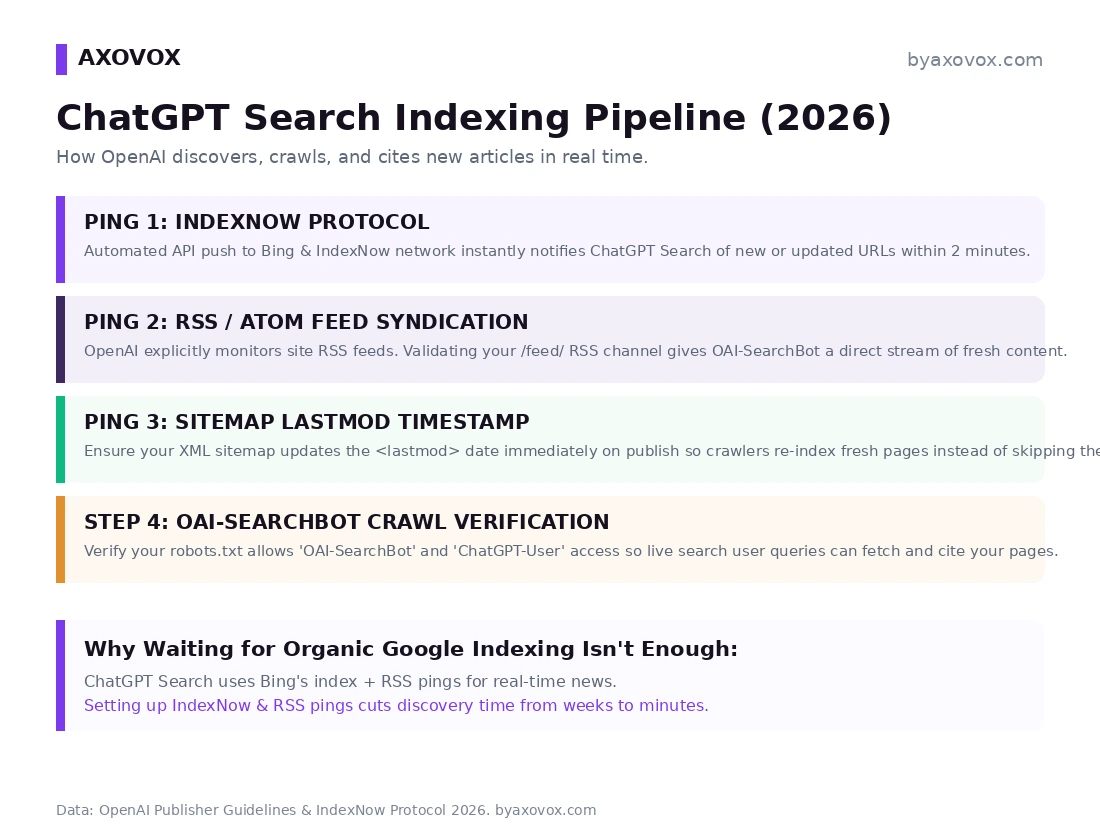
So “getting indexed fast” in ChatGPT Search is really three indirect levers plus one gate, and I’ll label which parts are documented, which are protocol facts, and which are what we’ve observed on our own sites. That honesty matters here, because this topic is drowning in guides that invent OpenAI features.
- OpenAI has no submission tool, so speed comes from Bing, the index ChatGPT Search draws on.
- Turn on IndexNow, for example through Rank Math’s Instant Indexing, so new URLs reach Bing the moment you publish.
- Keep your RSS feed uncached and give each sitemap URL a truthful lastmod date.
- Allow OAI-SearchBot in robots.txt and your firewall. OpenAI says blocked sites won’t appear in search answers.
- Test in a fresh ChatGPT chat with search on, asking the way a real reader would.
- Bing’s index: ChatGPT Search has leaned on Microsoft Bing alongside OpenAI’s own crawling since launch, which makes Bing’s freshness pipeline your fastest indirect door, and IndexNow is Bing’s instant doorbell
- OpenAI’s own crawler: OAI-SearchBot, per OpenAI’s crawler documentation, surfaces sites in ChatGPT’s search features; in our server logs it pulls robots.txt, the sitemap and our feed on its own schedule
- Live user-triggered fetches: ChatGPT-User grabs pages in real time when a person’s search needs them, your emergency exit even before any index catches up
No submission form exists for any of these. The levers below make you easy to discover; nothing makes discovery guaranteed, and anyone selling “instant ChatGPT indexing” is selling.
Lever 1: IndexNow, the instant ping into Bing’s side of the pipeline
IndexNow is a free, open protocol (Microsoft Bing, Yandex and others) that lets your site push new and updated URLs to participating engines the moment you hit Publish, instead of waiting to be crawled. Google ignores it; Bing acts on it, and Bing is the index ChatGPT Search draws on.
WordPress: if you run Rank Math, it’s already on board the ship you own: Rank Math → Instant Indexing enables IndexNow with an auto-generated key. That’s our setup on byaxovox, flipping it on took under a minute. Microsoft’s own IndexNow plugin does the same job elsewhere.
Custom sites: one HTTP POST at publish time:
POST /indexnow HTTP/1.1
Host: api.indexnow.org
Content-Type: application/json; charset=utf-8

{
  "host": "yourdomain.com",
  "key": "your-indexnow-api-key",
  "keyLocation": "https://yourdomain.com/your-indexnow-api-key.txt",
  "urlList": [
    "https://yourdomain.com/blog/new-article-slug/"
  ]
}
Publish a test post and open Bing Webmaster Tools → IndexNow: your URL should show as received within seconds. That part is instant and checkable. The ChatGPT side isn’t guaranteed or documented; in our own tests since enabling it, fresh posts have turned up in ChatGPT Search answers between roughly twenty minutes and a few hours, where pre-IndexNow it was days-to-never. Our sample, our sites, your mileage may vary, but the direction has been consistent.
Lever 2: a clean, uncached RSS feed
Straight talk first: OpenAI does NOT document RSS as an official discovery channel, and guides claiming it does are quoting a page that doesn’t exist. What’s real: our access logs, and plenty of other publishers’, show OAI-SearchBot fetching /feed/ alongside the sitemap, and a feed is the cheapest machine-readable “something new is here” signal a site can emit. Treat it as hygiene with observed payoff, not a promised pipe.
- Don’t truncate to a stub: give the feed a real excerpt or full content, so whatever reads it can judge the article, not just the headline
- Validate the XML: run yourdomain.com/feed/ through the W3C Feed Validation Service; one unclosed tag can choke parsers silently
- Un-cache it: if Cloudflare or your cache plugin holds /feed/ for 24 hours, every “instant” signal upstream arrives a day late. Set the feed to revalidate on publish
Lever 3: sitemap lastmod that tells the truth
Crawlers that fetch your sitemap, OAI-SearchBot among them in our logs, use lastmod to decide what’s worth re-reading. Two common ways sites sabotage themselves: plugins that stamp every URL with the same site-wide date, and omitting lastmod entirely. Either way, your genuinely new post looks like background noise.
<url>
  <loc>https://yourdomain.com/blog/new-post/</loc>
  <lastmod>2026-10-17T14:30:00+00:00</lastmod>
</url>
Bumping lastmod across the site without real changes is the oldest freshness trick there is, and crawlers learned it years ago: a sitemap whose dates don’t match reality gets trusted less, which is the opposite of what you wanted. Update lastmod when a page is published or meaningfully changed, nothing else.
The gate: OAI-SearchBot must be allowed, this one IS official
All three levers are decoration if the crawler can’t get in, and this is the single thing OpenAI’s documentation states plainly: sites opted out of OAI-SearchBot won’t be shown in ChatGPT’s search answers (they can still surface as bare navigational links). The three OpenAI agents, each controlled separately:
OAI-SearchBot: search indexing, the one this article is aboutChatGPT-User: real-time fetches when a user’s query needs your pageGPTBot: model training, blockable independently without touching search
# Visible in ChatGPT Search, no training
User-agent: OAI-SearchBot
Allow: /

User-agent: ChatGPT-User
Allow: /

User-agent: GPTBot
Disallow: /
Robots.txt is half the gate; the other half is your firewall. Security plugins and WAF rules block these agents by default more often than people think, our crawler-access guide shows how to read your logs and verify against OpenAI’s published IP ranges, which is also how we caught a client’s “ChatGPT ignores us” mystery that turned out to be a 2023 firewall rule.
Testing: is your new post actually findable?
- Open a fresh ChatGPT chat with web search enabled (the globe/search toggle; a logged-out or different account avoids your own history flavoring results)
- Ask naturally, the way a reader would: “What does [exact article title] cover? I think it’s on [yourdomain.com].” Operator syntax like site: isn’t reliably honored inside ChatGPT, so don’t trust a failed site: query as evidence of anything
- A citation link to your URL in the answer = findable. No citation = wait, then re-test; and check the levers in order: Bing (does your URL appear in Bing itself?), feed, lastmod, gate
Documented by OpenAI: the three crawlers and their separate roles, the allow-OAI-SearchBot requirement for search answers, the published IP ranges, and the absence of any submission route. Protocol facts: IndexNow’s free instant push into Bing, and Google’s non-participation in it. From our own sites and logs, labeled as such throughout: OAI-SearchBot’s sitemap and feed fetches, the twenty-minutes-to-hours post-IndexNow timings, and the firewall-rule client story. Unpublished and unknowable: how OpenAI’s pipeline weighs Bing versus its own crawl, its crawl scheduling, and anything about “priority.” This page gets updated if OpenAI ever ships a real submission channel; until then, distrust any guide that says one exists.
FAQ
How fast does ChatGPT Search index new articles?
There’s no guaranteed timeline and no official pipeline documentation. In our tests, with IndexNow enabled and OAI-SearchBot allowed, fresh posts surfaced in answers within roughly twenty minutes to a few hours; without those levers, days or never. Treat all precise promises as marketing.
Can I submit my site or RSS feed to OpenAI directly?
No: OpenAI offers no submission form, no ping endpoint, and documents no official sitemap or RSS program. Discovery runs through Bing’s index, OpenAI’s own crawling, and live user-triggered fetches; your levers are IndexNow, clean feeds and truthful sitemaps, plus the robots.txt gate.
Does ChatGPT Search use Google’s index or Bing’s?
Bing’s, supplemented by OpenAI’s own OAI-SearchBot crawling, which is why the fastest indirect route to ChatGPT freshness is Bing’s IndexNow doorbell, and why Google indexing your post says nothing about ChatGPT seeing it.
Is IndexNow free, and does Google use it?
Free and open, built into Rank Math’s Instant Indexing and Microsoft’s WordPress plugin. Google does not participate in IndexNow, so keep using Search Console for Google; the two systems don’t overlap.
Will blocking GPTBot keep my posts out of ChatGPT Search?
No: GPTBot governs model training only. Search answers require OAI-SearchBot access, and live fetches use ChatGPT-User; each is controlled independently in robots.txt, so block training and keep search without conflict.
Why does ChatGPT cite my old post but miss my new one?
Freshness lag in the pipeline: the old URL lives in the index, the new one hasn’t been discovered. Run the levers in order, IndexNow ping fired, URL visible in Bing, feed serving the post uncached, lastmod honest, and if all four pass, the live-fetch route usually closes the gap when a user’s query names your topic.
How do I know OAI-SearchBot is actually visiting my site?
Your access logs: look for the OAI-SearchBot user agent and verify the IPs against OpenAI’s published ranges, which protects you from spoofers. Firewall and security-plugin blocks are the most common silent killer we find in audits.