The first time I pointed an AI agent at a client’s store and told it to buy something, the transaction died in nine seconds. Cause of death: the spin-to-win discount wheel. The agent loaded the product page, a popup ate the screen, and instead of troubleshooting, it did what agents do, reported failure and moved on. No bounce recorded, no complaint filed. Just a sale that went somewhere else, invisibly.
This stopped being science fiction this autumn: OpenAI’s Instant Checkout lets ChatGPT complete purchases from Etsy and Shopify merchants directly in the chat, Google shipped its Agent Payments Protocol with dozens of payment partners, and the card networks launched their own agent programs. The buyer that researches, compares, fills forms and pays without ever seeing your design now exists at retail scale, early and small, but pointed one direction.
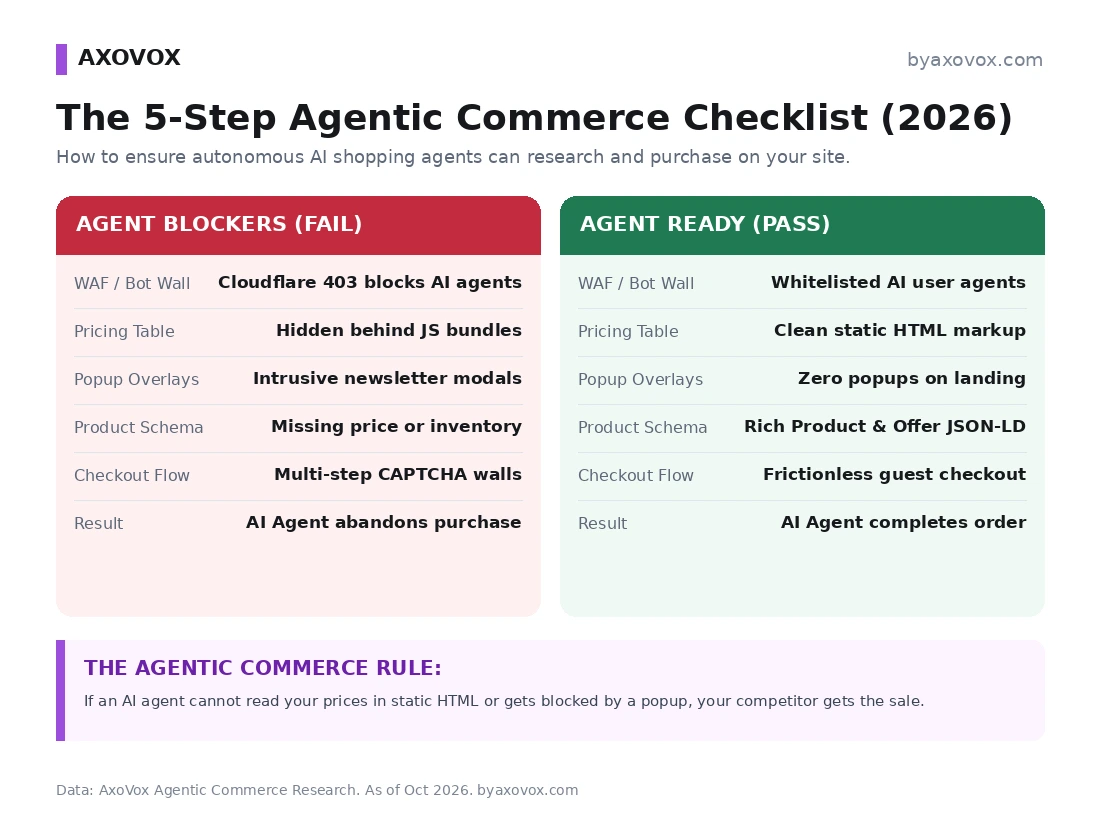
Most sites are built exclusively for human eyes, and the human-persuasion toolkit, popups, JS-revealed pricing, clever unlabeled forms, 2023-era bot walls, is precisely what kills agent transactions. Here’s the 5-step audit we run on client stores, and the ten-minute test that shows you your own site through an agent’s eyes.
- Check your firewall first. Old WAF rules that return 403 or 429 errors silently block AI shopping agents.
- Base prices must be in the HTML your server sends. Prices loaded later by JavaScript look like no price to many agents.
- Complete Product and Offer schema lets an agent confirm price, stock and shipping in one read.
- Auto-firing popups and discount wheels break agent checkouts. Keep product pages clear on first load.
- Label checkout fields with standard HTML labels and autocomplete attributes so agents don’t have to guess.
The whole audit in one paragraph
To take money from AI buying agents: (1) stop your firewall from 403-ing the legitimate agent user-agents, (2) serve prices in static server-rendered HTML instead of behind JavaScript, (3) ship complete Product and Offer schema including availability, shipping and returns, (4) kill the load-time popups that sit on your buy button, and (5) give checkout a guest path with standard, labeled, autocomplete-tagged form fields. Every step also improves accessibility and classic SEO; none of it hurts human visitors.
What is agentic commerce?
Transactions where an AI agent acts as the buyer: the human says “find a noise-canceling headset under $200 with 30-hour battery, compare the top three, buy the best one,” and the agent, ChatGPT’s agent mode and Instant Checkout, assistants built on Claude, browser agents like Comet, open agents like OpenClaw, locates products, verifies specs and stock, fills forms, and completes payment through an authorized rail. The human approves; the agent executes. Your site’s job shifts from persuading a reader to being parseable by a very literal, very impatient machine.
Step 1: audit your firewall before anything else
The most common agent-killer in our audits isn’t on the page at all: it’s a 403 Forbidden or 429 rate-limit from WAF rules written in 2023, when automated meant parasite. Those blanket rules now bounce purchasing agents carrying a real customer’s intent, and the money leaves no trace except a line in logs nobody reads.
| Agent user-agents | WAF action | Why |
|---|---|---|
| ChatGPT-User, OAI-SearchBot | Allow | ChatGPT’s live fetches and search; the path Instant Checkout research rides on |
| Claude-User, ClaudeBot | Allow Claude-User at minimum | Claude-User is the user-triggered fetcher; ClaudeBot doubles as training, your call per our robots guide |
| PerplexityBot, Perplexity-User | Allow | Perplexity’s answers and its shopping research |
| Anonymous bulk scrapers | Keep blocking | Tiering, not surrender: verified, signed agent traffic in, parasites out |
Check your security logs for blocked automation correlating with product and checkout URLs, that pattern is revenue bouncing off the door, and verify claimed agents against published IP ranges so spoofers don’t ride the whitelist; the workflow is in our crawler detection guide, and the training-vs-search split in the robots.txt rules.
Step 2: prices in static HTML, not behind a JavaScript curtain
Storefronts on Next.js or React often ship an HTML shell and hydrate prices by client-side API call a beat later. Humans never notice; many agent pipelines read the raw server response, and a price tag that exists as <div id="price-container"></div> in that response reads as nothing, which reads as “skip this store.”
The golden rule, with a 30-second test
Your base prices must exist in the HTML your server sends, a literal <span class="price">$149.99</span>, whatever the JavaScript does on top. Test it now: DevTools, disable JavaScript, reload. If your prices vanish, you’re invisible to the fastest class of buying agents. (Deliberately gating enterprise pricing is a choice you’re allowed to make; just know agents will report “pricing not public,” and our competitor-recommendation data shows where that leads.)
Step 3: Product schema with the fields agents actually check
Agents parse structured data before wrestling with your layout; complete Product and Offer JSON-LD, per the official product structured-data documentation, lets an agent confirm “in stock, under $200, ships in 3 days” in one read:
<script type="application/ld+json">
{
  "@context": "https://schema.org/",
  "@type": "Product",
  "name": "Ergonomic Office Chair Pro",
  "image": [ "https://yourdomain.com/images/chair-front.jpg" ],
  "description": "Adjustable mesh ergonomic office chair with lumbar support.",
  "sku": "CHAIR-PRO-01",
  "offers": {
    "@type": "Offer",
    "url": "https://yourdomain.com/products/ergonomic-chair/",
    "priceCurrency": "USD",
    "price": "249.00",
    "availability": "https://schema.org/InStock",
    "itemCondition": "https://schema.org/NewCondition",
    "priceValidUntil": "2026-12-31"
  }
}
</script>
Beyond the basics, two fields most stores skip and agents increasingly check, because the user’s instruction includes them: shippingDetails (cost and delivery window) and hasMerchantReturnPolicy (return window and rules). “Buy the best one with 3-day shipping” can only pick you if your 3-day shipping is machine-readable. And keep every value truthful against the page; an agent that catches your schema contradicting your HTML doesn’t ask which is right.
Step 4: kill the first-interaction overlays
A vision-driven agent loads your product page; the “10% off” modal covers Add to Cart; the agent’s click hits the invisible backdrop, the loop breaks, and it leaves, my nine-second funeral above was exactly this. The fixes:
- No auto-firing modals on product landing pages, and don’t serve lead-gen popups to automation signatures at all; they were never subscribing to your newsletter
- Every overlay dismissible properly: Escape key works, and the close button carries a real
aria-label="Close", which is what non-visual parsing reaches for - Prefer a sticky top banner that sells the discount without sitting on the only button that matters
Notice what this list also is: basic accessibility. Agents fail where screen readers fail, which is the recurring theme of this entire audit.
Step 5: a checkout a machine can finish
At checkout the agent maps stored credentials onto your fields, and <input id="field_xyz_99"> with no label forces guessing. Guessing agents abandon. Three requirements:
<!-- Agent-friendly form input -->
<label for="shipping-address">Shipping Address</label>
<input
  type="text"
  id="shipping-address"
  name="shipping_address"
  autocomplete="shipping street-address"
  aria-label="Shipping Street Address"
  required
/>
- Standard autocomplete values (given-name, email, postal-code, cc-number): a published vocabulary browsers and agents already speak; in our test runs, properly attributed forms are the difference between sailing through and stalling at the address block
- A real guest checkout: forced registration and pre-payment SMS verification walls end agent transactions cold; keep heavy verification where payment rails already provide it (the agent protocols carry signed user authorization) rather than duplicating it in front of the address form
- Optional, honestly labeled: an llms.txt file in your root indexing catalog, pricing and policies is an emerging convention some sites publish for agents; no major vendor documents reading it yet, so treat it as a cheap maybe, never a substitute for the four steps above
The ten-minute mirror test
- Take any agent that can drive a browser, ChatGPT’s agent mode, Comet, Claude, and prompt: “Go to [your URL], find [product], add it to the cart, proceed to checkout”
- Watch the transcript or recording like a horror film: where does it hesitate, misclick, or give up?
- Every stumble maps to one of the five steps. Fix, re-run, repeat until the agent reaches the payment screen clean
We run this on client stores as a standard audit item now, and I’d recommend it even to skeptics: watching a machine try to buy from you is the most clarifying UX review you’ll ever get for free.
Quick score: what wins, what blocks
Wins the agent’s money: whitelisted agent user-agents, server-rendered price tags, complete Product/Offer/shipping/returns schema, popup-free product pages, guest checkout with standard labeled fields.
Loses it silently: 2023-era 403 walls on agent traffic, prices that exist only after JavaScript, modals sitting on the buy button, mandatory registration or SMS gates before the address form, and schema that contradicts the page.
Who this audit is for, who can skip it
Run it if you sell anything online, e-commerce, digital products, bookable services, SaaS with self-serve pricing; the fixes cost hours and double as accessibility and SEO work either way. Skip it, for now, if your sales are purely relationship-driven enterprise deals with no self-serve path; agents can’t buy what requires three Zoom calls, though they already research you before call one.
What’s established here vs what’s our testing
Established and public: the live rails (OpenAI’s Instant Checkout with Etsy and Shopify merchants via Stripe’s protocol work, Google’s Agent Payments Protocol and its signed-mandate model, the card networks’ agent programs, the x402 micropayment protocol), the structured-data specification including the shipping and returns fields, and the autocomplete standard. From our own agent test runs, labeled as such: the popup death, the 403 pattern in client WAF logs, the form-mapping behavior, and the mirror-test failure map; your stack may fail differently, which is why the test exists. Honest unknowns: each agent’s exact parsing stack, whether llms.txt ever earns official support, and how fast consumer adoption curves, today’s agent-driven volume is small, and this audit is cheap insurance, not a revenue projection.
FAQ
What is an AI buying agent?
An autonomous AI system, ChatGPT’s agent mode and Instant Checkout, assistants built on Claude, browser agents like Comet, open agents like OpenClaw, that researches products, compares options, fills forms and completes purchases on a human’s behalf, with the human authorizing payment.
Do AI agents actually buy things today, or is this hype?
They buy today, at early scale: ChatGPT’s Instant Checkout completes purchases from Etsy and Shopify merchants in-chat, and the payment protocols (Stripe’s work with OpenAI, Google’s AP2, the card networks’ programs) exist because real transactions needed rails. Volumes are small; the infrastructure is not speculative.
How do I know if my website blocks AI buying agents?
Two checks: your WAF and security logs for 403/429 responses to agent user-agents (ChatGPT-User, Claude-User, PerplexityBot and friends), especially on product and checkout paths, and the disable-JavaScript reload test to confirm prices exist in static HTML. The ten-minute mirror test then catches everything else.
How do AI agents pay on websites?
Through authorized rails rather than typed card numbers: tokenized payment credentials the user pre-approves (the Instant Checkout model), virtual cards, and agent-payment protocols like Google’s AP2 that carry a signed mandate proving the human authorized the purchase.
Will optimizing for agents hurt the site for human visitors?
The opposite: honest schema, fewer blocking popups, server-rendered prices, labeled forms and guest checkout are also accessibility, mobile usability and classic SEO hygiene. Agents and screen readers fail in the same places; fixing for one fixes for both.
Should I allow GPTBot on an e-commerce site?
Separate the decisions: the agents that shop (ChatGPT-User, OAI-SearchBot, Claude-User) should stay allowed, while GPTBot governs model training and is yours to block or keep per the trade-offs in our robots.txt guide. Blocking training never stops the buying; blocking the fetchers does.
What is an llms.txt file, and do agents use it?
A proposed markdown index at yourdomain.com/llms.txt pointing AI systems to your catalog, pricing and policies. Honest status: no major vendor documents reading it, so publish it as a cheap maybe if you like, and spend your real effort on schema, static prices and the firewall, the layers agents demonstrably use.
What is the x402 payment standard?
An open protocol reviving HTTP’s dormant 402 Payment Required status so agents can pay for APIs, content and digital goods natively in the request flow, typically with stablecoins. Early, developer-oriented, the machine-to-machine end of the same shift.
Disclosure: this guide reflects agentic-commerce standards and our own agent test runs as of October 2026; the protocols move fast and this page is updated as they do. See our full disclaimer.