Disclosure: information and opinion, not sponsored. No affiliate links. Prices and features were checked on the vendors’ own pages on November 7, 2026. This category changes prices every few months, so confirm before you buy.
A client asked us last month why ChatGPT kept recommending two of their competitors and never them. Fair question. The harder question was the one underneath it: how often does it actually happen, and is it getting better or worse? You can’t answer that by typing a few prompts into ChatGPT on a Tuesday afternoon. That’s what AI search tracking tools are for.
There are now dozens of them. Most do roughly the same thing, at very different prices, and a couple of the best data sources are free. Here’s what’s worth paying for, and what isn’t.
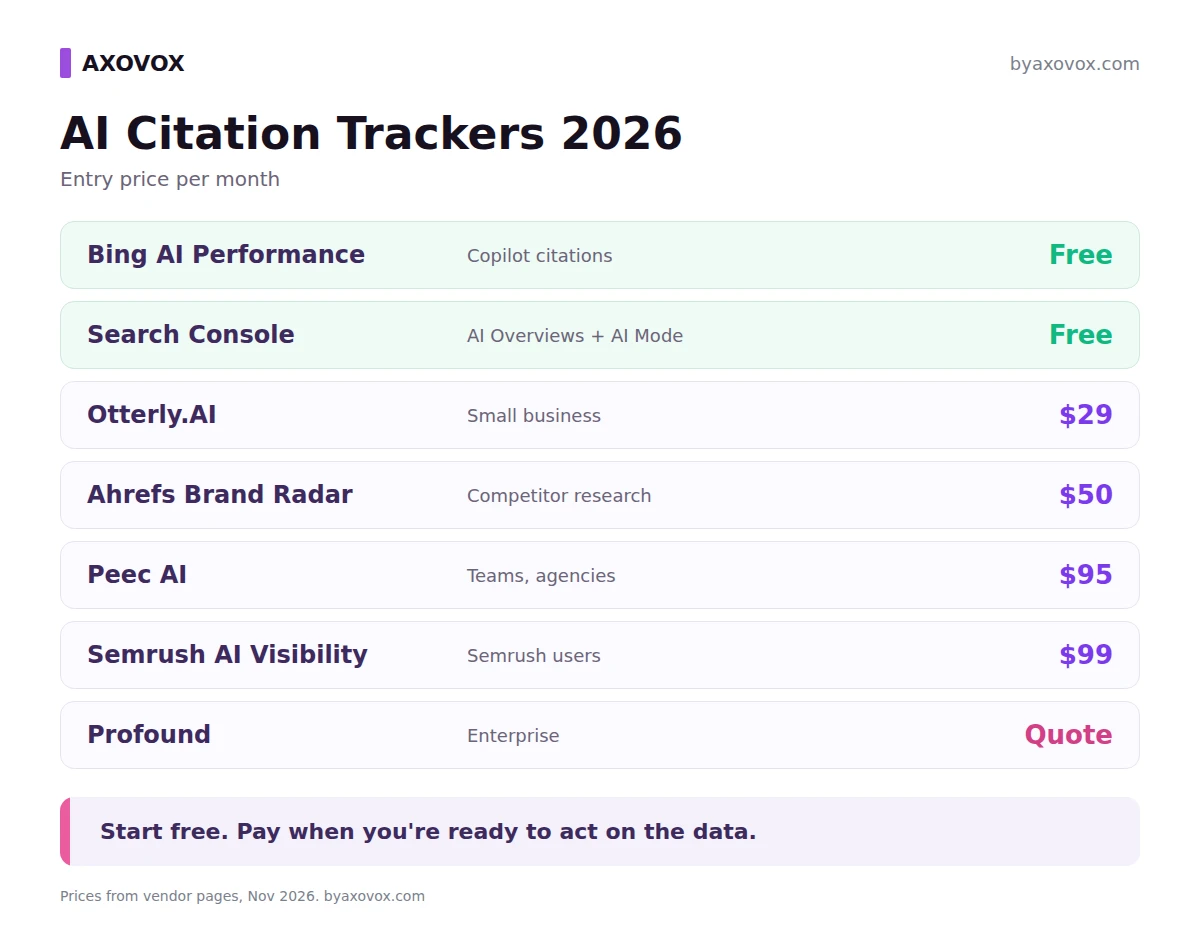
- Start free. Bing Webmaster Tools shows which of your pages Copilot cites, and Search Console now shows your AI Overviews and AI Mode impressions.
- Paid trackers run your prompts through AI platforms every day and count mentions, citations and competitors. Entry prices run from $29 to custom quotes.
- Otterly.AI is the cheapest real tracker, Peec AI is the best value for teams, and Semrush or Ahrefs make sense if you already pay for them.
- Profound no longer sells self-serve plans to brands. It’s a free trial, then an enterprise quote.
- AI answers change from run to run, so treat the numbers as trends over weeks, not exact rankings.
What these tools actually measure
An AI tracker works like a very patient intern. You give it a list of prompts, the kind of questions your buyers ask (“best CRM for a 10-person agency,” “is X worth it”). Every day it asks those questions on ChatGPT, Perplexity, Google AI Overviews, AI Mode, Gemini, Copilot or Claude, saves the answers, and counts.
The numbers you’ll see in almost every tool:
- Mentions: how often your brand name appears in the answer.
- Citations: how often your site is linked as a source. That’s a different thing. You can be mentioned without being cited, and the other way round.
- Share of voice: your mentions compared with competitors for the same prompts.
- Sentiment and position: whether the answer is positive, and whether you’re named first or fifth.
- Source domains: which sites the AI quotes. Often this is the most useful report, because it tells you where to get covered.
One thing to understand before you trust any dashboard. Ask ChatGPT the same question twice and you can get two different answers. Trackers deal with that by running prompts daily and averaging, which is why the data is a sample, not a ranking. A move from 12% to 15% in one week means very little. A move from 12% to 25% over two months means something.
Start with the free data
Before paying anyone, set up the two first-party reports. They don’t track competitors or ChatGPT, but they’re real data from the platforms themselves, not simulated prompts.
Bing Webmaster Tools, AI Performance. Launched in February 2026, it shows how often your pages are cited as sources in Microsoft Copilot, Bing’s AI summaries and some partner integrations, which pages, and the “grounding queries” the AI searched for, per Bing’s announcement. Later updates added intents, topics and a citation share metric. If your site is already in Search Console, you can import it in a couple of minutes.
Search Console, Generative AI performance report. Since August 31, 2026 every site has it. It shows impressions in AI Overviews and AI Mode by page, country and device, per Google’s help page. Impressions only, no prompts. We walk through reading it in our guide to seeing your AI Mode traffic in Search Console.
And for a quick gut check before any of this, our free AI visibility checker shows whether ChatGPT would recommend your business today.
The best AI search tracking tools in 2026, compared
Entry prices and coverage for the main AI citation trackers, monthly billing, as of November 2026:
| Tool | Entry price | Prompts on entry plan | AI platforms | Best for |
|---|---|---|---|---|
| Otterly.AI | $29/mo | 15, daily | ChatGPT, AI Overviews, Perplexity, Copilot (others as add-ons) | Small businesses, first tracker |
| Peec AI | $95/mo | 50, daily | Pick 3: ChatGPT, AI Mode, AI Overviews, Copilot, Gemini, Naver | Teams and agencies |
| Semrush AI Visibility | $99/mo per domain | 25, daily | ChatGPT and Google AI Mode for prompt tracking | Existing Semrush users |
| Ahrefs Brand Radar | $50/mo (custom prompts) or $199/mo (index) | About 80 a day on 1 platform | AI Overviews, AI Mode, ChatGPT, Perplexity, Gemini, Copilot, Claude | Competitor research at scale |
| Profound | Free trial, then custom | 50 for 7 days on trial | Up to 9 on Enterprise | Large brands |
Otterly.AI: the cheapest real tracker
Lite is $29 a month for 15 prompts tracked daily on ChatGPT, AI Overviews, Perplexity and Copilot, with unlimited team members, per Otterly’s pricing page. Standard is $189 for 100 prompts and Premium $489 for 400. Claude, Gemini and AI Mode cost extra, and the Claude add-on gets expensive on bigger plans.
Fifteen prompts sounds tiny. For a local business it’s honestly enough: your five main services, your brand name, a few “best X in [city]” questions. Start there and see if the numbers move.
Peec AI: best value for teams
Starter is $95 a month for 50 prompts on three AI platforms of your choice, Pro is $245 for 150, Advanced $495 for 350, all with unlimited users and daily tracking, per Peec’s pricing page. Annual billing takes about 15% off. Claude and some other models are Enterprise only, which is the main catch.
What we like is the source reporting. It shows which domains each AI leans on for your prompts, and that list usually tells you more than your own score. If one review site shows up in half the answers, that’s your next outreach target.
Semrush AI Visibility Toolkit: if Semrush is already open all day
$99 a month gets one domain and 25 prompts tracked daily, per Semrush’s knowledge base. Extra domains and extra users are $99 each, and 50 more prompts cost $60. There’s no free trial for the toolkit. The Semrush One plans bundle it with the SEO suite from $199 a month, which is the better deal if you need both.
It’s convenient rather than cheap. Two users and two brands quickly cost more than Peec with unlimited seats.
Ahrefs Brand Radar: research first, tracking second
Brand Radar comes at the problem from the other end. Instead of only tracking your prompts, it has a database of hundreds of millions of prompts Ahrefs already ran, so you can look up any brand, including competitors, without setup. Custom prompt tracking starts at $50 a month for 2,500 checks, the AI index at $199 per platform, and all platforms at $699, per Ahrefs’ Brand Radar page.
Watch the “checks” math. One prompt on one platform in one location is one check, and Claude uses eight. Track 20 prompts daily on three platforms and you’ve used 1,800 checks a month.
Profound: enterprise only now
Profound is often listed first in these roundups, and lots of them still quote its $99 and $399 plans. Those are gone. In September 2026 it dropped self-serve brand plans, and its pricing page now shows a free 7-day trial and a custom Enterprise plan. Agencies can still sign up per client workspace. It’s a strong product with the widest engine coverage, but it isn’t a small business tool anymore.
How many prompts do you actually need?
Fewer than the sales pages suggest. A good starter set is 20 to 50 prompts, split roughly like this:
- Category questions without your name: “best accounting software for freelancers.”
- Comparison questions: “X vs Y,” “alternatives to Y.”
- Brand questions: “is X legit,” “X pricing,” “X reviews.”
- Problem questions your product solves, written the way a person would type them.
Write them in full sentences. People don’t type keywords into ChatGPT, and prompts written like keywords give you data about a search nobody makes.
Worth paying for
- Daily tracking on the platforms your buyers use
- Competitor share of voice for the same prompts
- Source domain reports
- History, so you can see trends over months
Not worth paying extra for
- A single “AI visibility score” with no detail behind it
- Hundreds of prompts before you’ve fixed the basics
- Platforms your customers don’t use
- Hourly tracking. Daily is plenty.
What to do with the data
A tracker only tells you where you stand. Here’s what usually moves the numbers once you see the gaps:
- Answer first. Put a direct, two or three sentence answer at the top of each section, under a heading that says what the section is about. AI systems pull passages, not whole pages.
- Get covered where the AI already looks. Your source domain report shows which review sites, directories and forums get quoted. Being on those pages often matters more than anything on your own site.
- Show up in community discussions honestly. Reddit and niche forums get cited a lot. Helpful answers from a real account work. Planted praise gets spotted and removed.
- Keep facts consistent. Same prices, same features, same description on your site, your Google profile and directory listings.
If a competitor keeps getting recommended instead of you, we cover the specific fixes in why AI search recommends your competitor. And skip the llms.txt hype. It’s harmless, but there’s no evidence it changes which brands get cited.
If buyers research your category in ChatGPT or Perplexity, B2B software, agencies, e-commerce and anything people compare before buying, a paid tracker earns its cost. For a local service business, the free Bing and Search Console reports plus a monthly manual check are usually enough. Pay for a tool when you’re ready to act on what it shows you, not before.
Common questions
What is the difference between SEO rank tracking and AI rank tracking?
SEO rank tracking records where your page sits in Google’s results for a keyword. AI rank tracking records whether AI answers mention or cite your brand for a prompt, and how often compared with competitors. AI answers vary from run to run, so the results are averages over time, not fixed positions.
How do AI search tracking tools collect data?
They run a list of prompts on AI platforms such as ChatGPT, Perplexity, Gemini and Google AI Overviews, usually daily, save the answers and count brand mentions, citations, sentiment and which sources were quoted.
Is there a free way to track AI citations?
Yes. Bing Webmaster Tools has a free AI Performance report showing which of your pages Microsoft Copilot cites. Google Search Console’s Generative AI performance report shows your impressions in AI Overviews and AI Mode. Neither covers ChatGPT or competitors.
What is the cheapest AI visibility tracker?
As of November 2026, Otterly.AI Lite at $29 a month for 15 daily prompts across ChatGPT, Google AI Overviews, Perplexity and Copilot is the cheapest dedicated tracker from a well-known vendor.
Can I track Google AI Overviews in SEO tools?
Yes. Semrush and Ahrefs both track AI Overviews and AI Mode alongside regular rankings, and Search Console reports your AI Overviews and AI Mode impressions for free.