
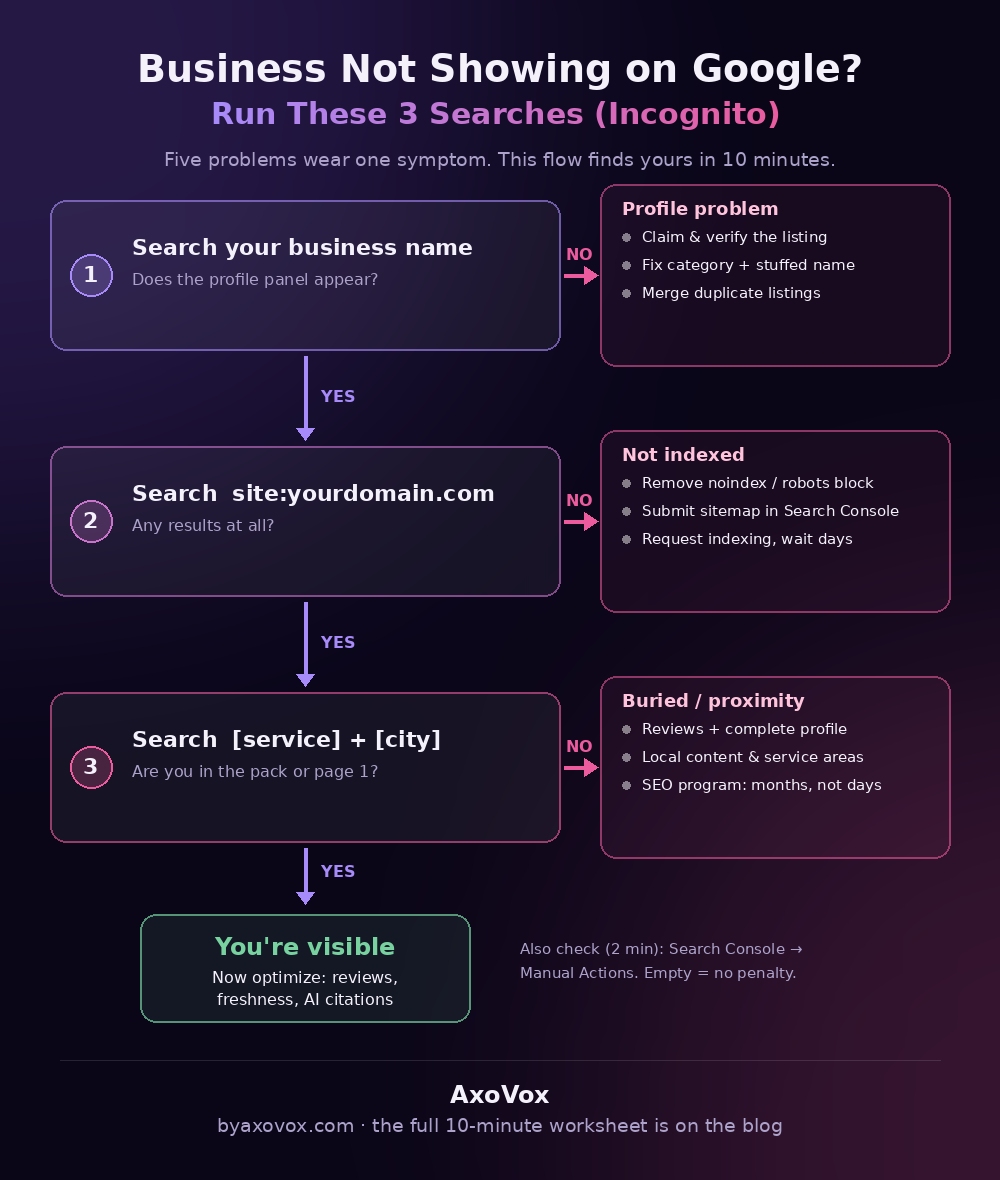
“Not showing up on Google” is actually five different problems wearing the same symptom: your site isn’t indexed, your site is indexed but buried, your Business Profile has an issue, the proximity filter is working against you, or you’re testing wrong and it shows for everyone except you. Each has a different fix, and you can identify yours in about ten minutes. Here’s the diagnosis, in the order to check.
site:yourdomain.com: tests whether your website is indexed at all. (4) Your main service + city, in an incognito window: tests real-world visibility. Whichever search fails first points to your problem, and the matching fix is below.
First, make sure you’re testing correctly
Before diagnosing anything, know that Google shows different results to different people. Your own searches are skewed by your history, your login, and above all your location. A business can rank #1 for a searcher two streets away and be invisible to someone across town. So test in an incognito window, and treat “my friend across the city can’t find us” as expected behavior for local results, not a crisis. The proximity effect is real and strong: the map pack that appears in 93% of local-intent searches is assembled per-searcher, distance included.
Problem 1: your website isn’t indexed at all
The test: search site:yourdomain.com. Zero results means Google hasn’t indexed your site, and nothing else on this page matters until that’s fixed.
The usual causes, in order of frequency:
- The site is new. Indexing takes days to weeks. Speed it up: create a free Search Console account, submit your sitemap, and use URL Inspection → Request Indexing on your key pages.
- A leftover noindex. Site builders and WordPress have a “discourage search engines” setting that developers enable during construction and forget. In WordPress: Settings → Reading. This one accounts for a comic share of “Google hates us” panics.
- robots.txt blocking everything. Check
yourdomain.com/robots.txtfor a strayDisallow: /.
Problem 2: indexed, but buried
The test: site: shows results, your name search works, but service searches never surface you.
This isn’t a malfunction; it’s competition. Roughly 95% of new pages don’t reach the top 10 within their first year, because the pages above you have years of accumulated authority. The fix is the unglamorous one: content targeting winnable queries, a healthy site, and time. The realistic schedule (first movement in months 2-3, first page-one wins around months 4-6) is laid out in our honest SEO timeline. Anyone promising to fix “buried” in a week is describing a scam, not a service.
Problem 3: your Business Profile has an issue
The test: your name search shows no profile panel, or Maps can’t find you.
Work through these:
- Never claimed or verified. Search your business on Maps, hit “Own this business?”, and complete verification. Unverified profiles get minimal visibility.
- Suspended. If the profile existed and vanished, log into the dashboard and look for a suspension notice. The two classic causes: keywords stuffed into the business name and address problems (virtual offices, home addresses shown for service businesses). Fix the violation, then appeal; expect days to weeks.
- Wrong or missing category. A profile categorized as “Consultant” won’t show for “plumber near me” no matter how good it is. The category is the strongest single lever on the profile.
- A duplicate is stealing you. Old addresses, rebrands, or a well-meaning employee can create second listings that split your reviews and confuse Google. Find and merge them.
The complete section-by-section repair is our Business Profile checklist, and it doubles as the fix list here.
Problem 4: the proximity filter is beating you
The test: you show up fine near your location and disappear a few kilometers out.
That’s the map pack working as designed. Distance is a core ranking factor, and you can’t override geography, but you can widen your radius: more reviews with recency (review signals are roughly 16% of local ranking), a fully complete profile, and location-relevant content. A service business can also set honest service areas rather than relying on one pin. The whole sequence is in the local SEO checklist. What doesn’t work: fake addresses across town, which leads straight back to Problem 3’s suspension section.
Problem 5 (rare): a penalty
Everyone’s first fear, almost never the actual cause. Check it anyway in two minutes: Search Console → Security & Manual Actions. Empty means no penalty, and you can stop worrying about it. If something’s there, it names the violation, usually spammy links or thin content from a past cheap provider, and recovery means fixing the cause and filing reconsideration. Slow, but documented.
The 10-minute worksheet, in order
- Incognito window open.
- Search your exact business name. Profile panel appears? Business visibility is fine; skip to step 4.
- No panel: go through Problem 3’s list, starting with claim-and-verify.
- Search
site:yourdomain.com. Zero results: Problem 1. Results exist: continue. - Search your main service + city. You’re absent from map pack and page one: Problem 2 and 4 territory, which is a program, not a switch.
- Two minutes in Search Console: indexing report and manual actions, to rule out Problems 1 and 5 formally.
By the end you know which of the five you have, and importantly, which expensive fixes you don’t need.
Frequently asked questions
How long until a new website shows up on Google?
Indexing: days to a few weeks, faster if you submit a sitemap in Search Console and request indexing. Ranking for anything competitive: months. A brand-new site appearing for its own name within a week or two is on schedule; appearing for “best [service] in [city]” takes the long game.
Why does my business show up for me but not for other people?
Personalization and proximity. Google tailors results to each searcher’s history and location, and local results shift block by block. Test in incognito, and accept that visibility fades with distance from your location; widening that radius is what reviews, profile completeness, and local content are for.
My business used to show on Google Maps and disappeared. Why?
Usually one of three: a suspension (check the dashboard for a notice, and the business name for added keywords, the most common trigger), an unresolved Google-suggested edit that changed your details, or a duplicate listing that got merged the wrong way. All three are visible from the profile dashboard within minutes.
Do I have to pay Google to show up?
No. The Business Profile, Maps presence, and organic rankings are free; ads are a separate, optional layer on top. Anyone cold-calling to say your listing will be removed unless you pay is running a scam that’s been around for a decade. Genuinely: hang up.
My website shows on Google but not on Maps. What’s going on?
Those are two separate systems. Websites live in the regular index; Maps runs on Business Profiles. A site can rank while the business has no claimed profile, and vice versa. If Maps is the gap, the fix is Problem 3: claim, verify, categorize, complete.
Can a web designer or SEO company get me indexed faster?
For pure indexing, barely; sitemap submission and clean technical setup is most of what’s possible, and you can do it free in Search Console. Where professionals earn their fee is Problem 2, turning “indexed but invisible” into rankings, which is months of real work. Be suspicious of anyone charging much for the first and promising miracles on the second.
The bottom line
Five possible problems, four searches to tell them apart, and only one of them (being outranked) takes serious time to fix. Most businesses that “aren’t on Google” turn out to have a ten-minute profile or indexing issue that’s been quietly costing them customers for months. Run the worksheet today; the diagnosis is free and the most common fixes are too.
Ran the checks and still stuck, or found Problem 2 and want the program that fixes it? Send us your business name and domain. We’ll confirm the diagnosis and tell you exactly what it takes, in plain numbers.