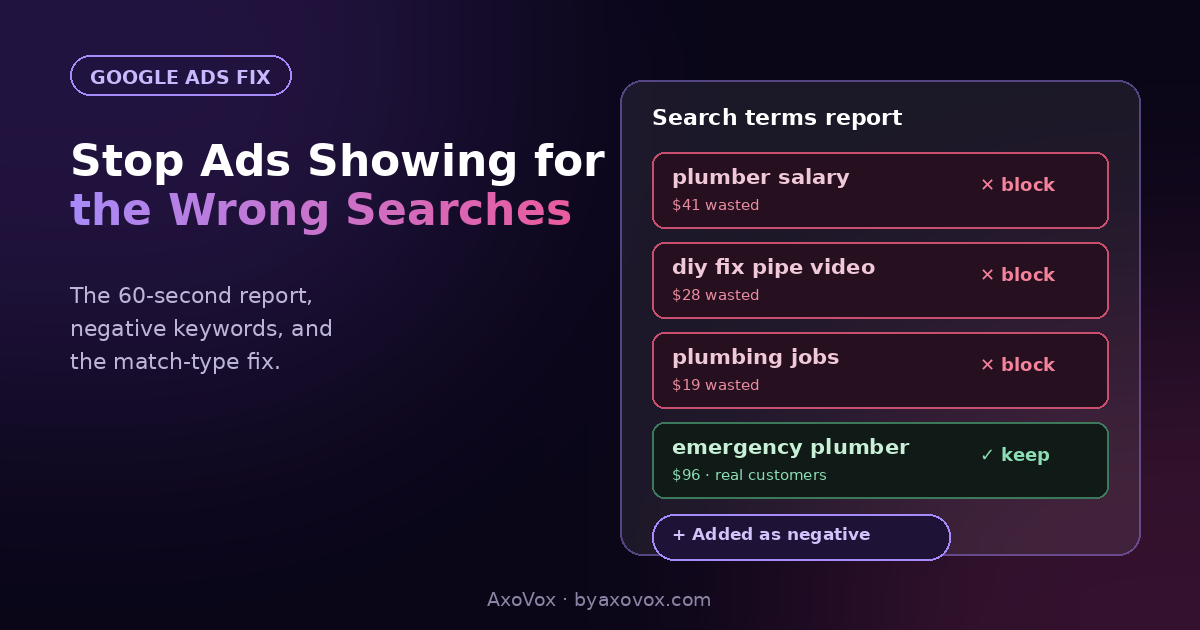
A wedding photographer’s ad, clicked by someone hunting for a used camera. A plumber’s budget, spent on “plumber salary” searches. An accountant paying for clicks from students googling homework answers. Every one of those clicks cost the same as a real customer’s.
This is the single biggest leak in small Google Ads accounts, and the maddening part is that the platform knows exactly which searches triggered your ads. It just keeps that list one level deeper than the screens you normally see.
Here’s where the list lives, how to read it, and the two fixes, one downstream, one upstream, that close the leak for good.
The 60-second report
In Google Ads, open your campaign, go to Insights and reports → Search terms. That’s the list of real searches, word for word, that triggered your ads and spent your money.
Sort by cost, highest first. Most owners find something indefensible in the top ten within a minute. That’s normal, and it’s fixable today.
Why your ads show for searches you never chose
You picked keywords. Google matched them “helpfully.” Unless you told it otherwise, your keywords run in broad match, which lets Google show your ad for anything it considers related, and its idea of related is generous: synonyms, adjacent topics, “people also searched for” territory.
So “photography packages” reaches camera-deal hunters, “tax help” reaches homework, “garage door repair” reaches DIY video searches. Google isn’t cheating; broad match sometimes finds genuine customers you’d have missed. But it does so by gambling your budget on volume, and at small budgets the gamble mostly loses. The searches that convert are boringly literal, and literal is exactly what the default setting isn’t.
Fix one, downstream: negative keywords
Add negatives from the search terms report
- In the Search terms report, tick the box next to any search you never want to pay for again
- Click Add as negative keyword
- Choose campaign level (blocks it everywhere in the campaign), then save
Preload the classics before they cost you
Every service business should block these on day one, don’t wait to pay for the lesson:
- Job hunters: jobs, careers, salary, hiring, apprenticeship, course, training, certification
- DIY researchers: how to, DIY, yourself, tutorial, video, manual, instructions
- Bargain dead-ends: free, cheap (yes, block “cheap” unless you want those calls), craigslist, used
- Wrong intent for you: your call. A residential plumber blocks “commercial”; a premium salon blocks “walk in”
Make it a 5-minute weekly habit
- Open the search terms report every Monday, sort by cost
- Add the week’s nonsense as negatives
- Accounts typically need heavy pruning for 3-4 weeks, then a trickle. The habit stays.
Will blocking searches hurt my reach?
It shrinks reach and that’s the point: you’re trimming the audience that was never going to buy. What actually happens in the numbers: impressions drop, clickthrough rate rises, cost per lead falls, and Google’s own bidding gets smarter becuase the conversion data feeding it stops being polluted by camera shoppers. Smaller, cleaner, cheaper. Every healthy small account looks like this.
Fix two, upstream: match types
Negatives are the mop. Match types are turning off the tap.
Wrap your keywords in quotes for phrase match (“emergency plumber”) or brackets for exact match ([emergency plumber near me]) and Google’s matching gets dramatically more literal. For small budgets our default is phrase and exact only: you’ll get fewer impressions and miss the occasional creative match, and in exchange nearly every click starts from a search that actually resembles your business. At $500-1,500/month, that trade wins almost every time, and it’s half the reason the budget math in our Google Ads budget guide works at all.
If money’s still leaking
The search terms look fine but results don’t. The leak may be elsewhere: location settings including “interest in” your area, or Display network quietly enabled. The full leak map, category by category, is in our guide to where Google Ads budgets get wasted.
Google keeps “recommending” broad match. The recommendations panel will nag you to loosen match types and raise budgets forever. Recommendations optimize for spend, not for your profit. Dismiss freely.
Some search terms show as “hidden”. Google groups low-volume terms without showing them individually. Annoying, unavoidable, and another argument for tight match types, which shrink the hidden bucket.
You blocked something you shouldn’t have. Negative keyword lists are editable: Keywords → Negative search terms, remove the entry. Nothing is permanent.
Performance Max campaign? PMax hides most search terms and accepts limited negatives. If you can’t see where money goes, that’s a campaign-type decision, not a settings tweak; a plain Search campaign gives the control this article assumes.
Common questions
How do I stop Google Ads showing for irrelevant searches?
Two moves: add the irrelevant searches from your Search terms report as negative keywords, and tighten your keywords to phrase and exact match so loose matching stops at the source. Together they typically clean up an account within a month.
What are negative keywords in Google Ads?
Words and phrases you never want your ads to show for. Add “salary” as a negative and searches containing it stop triggering your ads, no matter how well your other keywords match.
Where is the search terms report?
Inside your campaign: Insights and reports → Search terms. It shows the actual searches that triggered your ads, with cost and clicks per term, which makes it the most honest page in the entire platform.
How many negative keywords should I have?
Mature small accounts commonly run dozens to a few hundred. There’s no penalty for having many; there’s only the ongoing cost of having few. Preload the classic lists, then add weekly from real data.
Should I use broad match at all?
At small budgets, generally no. Broad match is a discovery tool that needs lots of conversion data and budget slack to pay off. Phrase and exact match spend a small budget on searches that resemble your business, which is what a small budget is for.
How often should I check the search terms report?
Weekly, five minutes, sorted by cost. New accounts need it most in the first month; established ones still grow fresh nonsense, just slower.