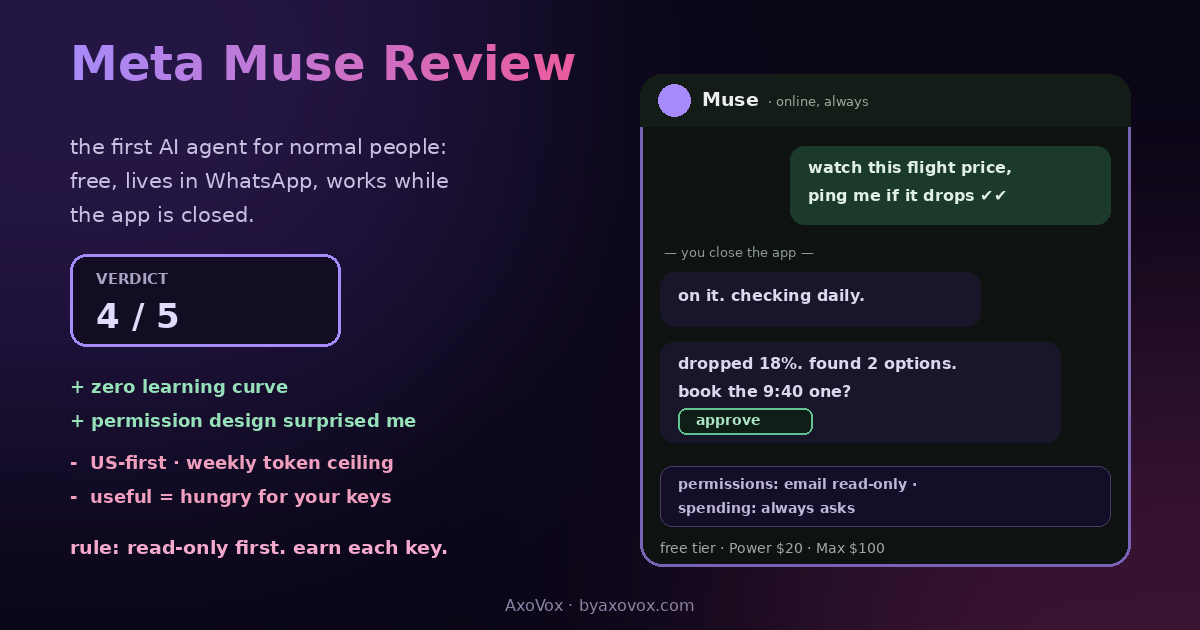
The most telling thing about Meta Muse is where it lives: inside WhatsApp, in a thread, like a person. No dashboard, no workflow builder, no prompt library. You text it “find me a cheaper plan for my phone line and tell me when you’ve got options,” close the app, and it pings you back later like a very organized friend who happens to own a browser.
Muse launched September 8, 2026, built by Meta Superintelligence Labs under Alexandr Wang, pitched by Zuckerberg as “the personal agent that understands your goals and works 24/7,” and downloaded roughly 730,000 times in its first five days on its way to #1 on the iOS chart. Every company shipped an agent this autumn; Meta shipped the one that asks nothing of you: no setup ritual, no prompt craft, no manual. I’ve spent a week giving it chores, and the review splits cleanly into two sentences: it’s the easiest agent I’ve ever set up, and the better it got at my life, the more of my life it asked to hold.
What it is (and what it isn’t)
An agent, not an assistant, and the difference stopped being marketing this year: you give Muse a GOAL, it plans, browses, uses your connected apps, acts, and returns for approval, continuing after you close the app. It runs on what Meta calls Muse Secure VM, a dedicated virtual machine holding both the agent and your data, powered by the Muse Spark 1.3 model, reachable via its own app (iOS/Android), muse.ai, or WhatsApp. It is not Meta AI, the assistant sprinkled across Meta’s apps; Muse is the one with hands. And it’s strictly personal: no team features, no admin console, which tells you exactly who it’s for.
A week of chores, honestly scored
What it nailed: price-watching (tracking a flight and a lens I’ve been stalling on, with a ping when one dropped), inbox triage summaries that actually read the threads, a restaurant booking end to end, and form-filling that would have cost me twenty minutes of copy-paste. The persistent memory is quietly the best feature: it’s one long conversation about your life, so “the trip I mentioned” resolves without re-explaining, and side-chats keep projects from tangling.
Where it stumbled: anything requiring an app it can’t connect; the integration list is consumer-short next to developer agent platforms, so niche tools are out of reach. Multi-step goals occasionally stall politely waiting for an approval I didn’t notice. And the free tier’s weekly allowance, measured in Muse tokens, is genuinely usable but finite: a heavy week of delegation hit the ceiling, which is of course the business model (Power at $20/month, Maximum at $100) introducing itself.
The part that’s actually impressive: the permission design
This is the section I expected to write angrily and can’t. Access is granular per connector, email can be read-only or send-capable, your choice per app; sensitive actions (sending, spending) stop for approval; there’s an activity log and an upcoming-tasks view, so the agent’s week is auditable; interactions can be opted out of model training; and Meta states VM data isn’t shared with its ad systems. For a company with Meta’s reputation, this is the most carefully fenced consumer product they’ve shipped, and other reviewers landed in the same surprised place. The fences are policy, not physics, more on that below, but as DESIGN, it embarrasses several competitors.
| Tier | Price | What you get |
|---|---|---|
| Free | $0 | The full agent with a weekly token allowance; real use, real ceiling |
| Power | $20/mo | Bigger weekly allowance for daily delegators |
| Maximum | $100/mo | The heavy-automation tier for people running their life through it |
The discomfort, stated plainly
Muse’s usefulness scales exactly with access, and that line only goes one direction. A price-watcher needs nothing; an inbox manager needs your mail; a life assistant wants mail, calendar, payments and memory, and the product gently escalates because every escalation genuinely helps. TechRadar’s reviewer called it “incredibly useful” and “deeply uncomfortable” in the same headline, and that’s the correct review in six words. My house rules, same family as our Comet rule: start read-only, add one connector at a time only after the agent earns it, keep approvals on for anything that sends or spends, and remember the ad-system separation is a promise from a company whose history with promises you already have opinions about. Also the structural risk every acting-agent carries: software that reads pages and acts can be attacked through pages. Scoped access is your seatbelt.
Verdict: 4/5
As the agent built for the widest possible audience, Muse is a genuine achievement: zero learning curve, free enough to matter, lives where the messages already are, with permission architecture that respects the user more than I expected from the house of blue thumbs. Dock a point for the US-first rollout, the short integration list, and a trust ask that deserves more friction than most users will give it. Get it if you want digital chores done and you’ll keep the one-connector-at-a-time discipline. Wait if you’re outside the rollout or your tasks live in niche tools. Power users: Dots and friends are deeper; Muse’s bet is that depth was never the mass market’s problem, and 730K downloads in five days suggests the bet is landing.
How this review was done
A week of real chores on the free tier across the app and WhatsApp, with connectors added read-first; the stumbles and ceilings above are the ones I actually hit, and I’ll revisit the score when the integration list and rollout widen. Launch claims (Secure VM, training opt-out, ad-system separation, Spark 1.3) are Meta’s statements from the announcement, labeled as such, not independently verifiable from outside. The download figures are from launch-week chart reporting. This page updates as Muse does; agent products this young change monthly.
Common questions
What is Meta Muse?
Meta’s personal AI agent, launched September 8, 2026: give it goals in plain language and it browses, uses your connected apps, completes multi-step tasks and keeps working after you close the app, returning for approvals. It runs on a dedicated Muse Secure VM and is reachable via the Muse app, muse.ai, or WhatsApp.
Is Meta Muse free?
Yes, with a weekly allowance measured in Muse tokens that real use can exhaust; Power ($20/month) and Maximum ($100/month) raise the ceiling. The free tier is a genuine product, not a demo.
What can Meta Muse actually do?
Track prices, triage and summarize email, book reservations, shop and check out, fill forms, manage reminders, draft documents and images, and pursue longer-running goals in the background, with sensitive actions held for your approval.
Is Meta Muse safe to connect to my email and accounts?
The permission design is the best part: per-connector read/write choices, approval gates on sending and spending, an auditable activity log, training opt-out, and Meta’s stated separation from ad systems. The sane protocol remains start read-only, escalate slowly, and keep approvals on; the separation is policy, not physics.
What’s the difference between Muse and Meta AI?
Meta AI is the assistant across Meta’s apps, it answers and chats. Muse is the agent with its own secure computer that takes actions on your behalf. Different products, deliberately.
Is Muse better than ChatGPT’s agents?
Different aim: OpenAI’s Dots target paid tiers and deeper work; Muse targets everyone, free, inside WhatsApp, with fewer integrations and zero learning curve. For household chores Muse is the easier win; for sustained knowledge work it isn’t trying to compete.
Where is Meta Muse available?
US-first at launch (app, muse.ai, WhatsApp), with the usual staged expansion; availability is the current review’s biggest asterisk and the first thing I’ll update.
Does Muse work inside WhatsApp?
Yes, natively: you message it like a contact, which is precisely the design thesis, the agent lives where your messages already are instead of asking you to visit it.