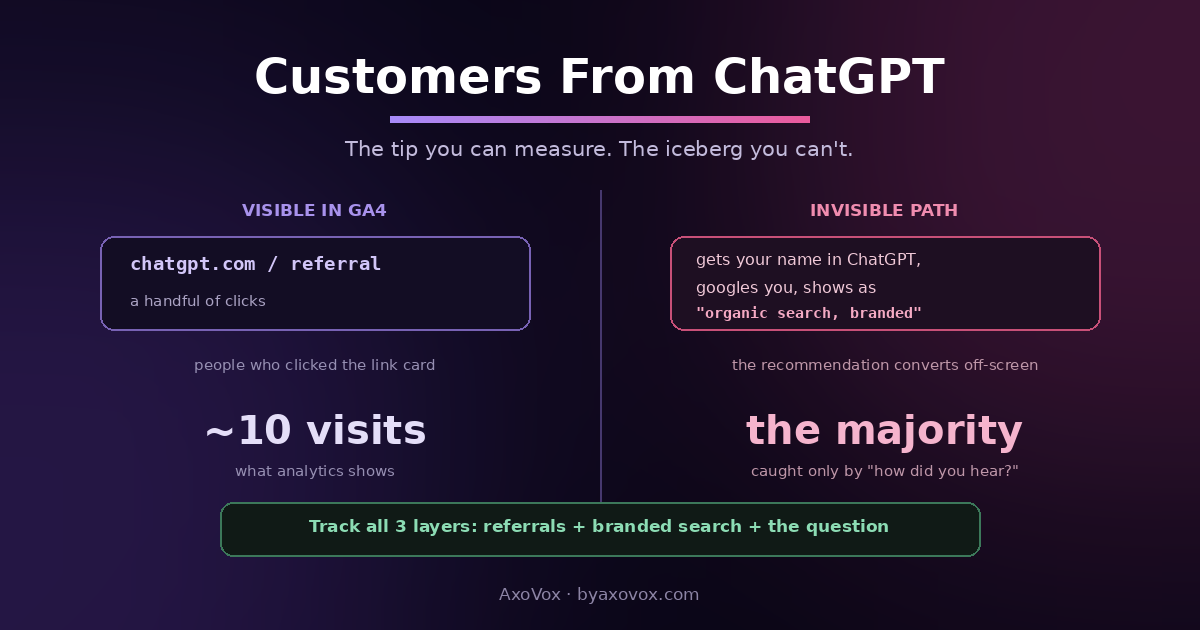
Somewhere in your analytics, there may already be a line that didn’t exist two years ago: visitors arriving from chatgpt.com. And even if that line shows a handful of visits a month, the real number of customers ChatGPT sends you is bigger, sometimes much bigger, because most of them arrive by a road your analytics can’t label.
Here’s the mechanism nobody explains: ChatGPT recommendations mostly convert off-screen. A person asks who to hire, gets your name, and then does the natural human thing: opens Google and searches your business name to check you out. That visit lands in your analytics as “organic search, branded”, looking like a customer who already knew you, when it was actually AI’s referral wearing a disguise. Click-through referrals from ChatGPT itself are the tip; the name-search path is the iceberg.
So real tracking takes three layers: the referral report (what’s measurable), the branded-search proxy (what’s inferable), and one old-fashioned question (what catches everything). Here’s each, set up in under an hour.
Layer 1: see the direct referrals in GA4 (10 minutes)
In GA4, open Reports → Acquisition → Traffic acquisition, and in the table search box type chatgpt. Visits from ChatGPT’s link cards show with a source like chatgpt.com / referral. To watch it over time, add the filter and pin a comparison against last quarter.
Worth checking cousins while you’re there: search for perplexity, copilot, gemini. The whole AI-referral family lives in the same report.
What the referral number means, and what it hides
Treat the chatgpt.com line as a floor, never the total. It only counts people who clicked a link inside ChatGPT’s answer, and much of the audience doesn’t click: they take the name and leave. What the floor is genuinely good for: direction (is it growing quarter over quarter?) and landing pages (which of your pages does ChatGPT link people into? Those pages are your AI-trusted assets, same logic as the Pages table in Google’s new AI report, which covers the other half of the AI world).
Layer 2: the branded-search proxy
Read the disguised arrivals (15 minutes, monthly)
- Open Search Console → Performance → Search results, and filter queries containing your business name
- Watch the trend across months: rising name searches without a matching rise in your advertising or press is the classic AI-influence signature, people are hearing your name somewhere invisible and checking you out
- Look for misspellings and name+city variants growing too; people type what the AI told them, imperfectly
Corroborate before concluding (5 minutes)
- Branded search also rises from word of mouth, a viral post, or local press, so cross-check: no campaign, no press, no social spike, but names searches climbing and AI answers naming you (test them yourself monthly)? The inference is sound
- Log one number monthly: branded-query impressions. It’s the best available proxy for total AI influence, Google-side and ChatGPT-side combined
Layer 3: the question that catches everything
The unsexy champion of AI attribution is a form field: “How did you hear about us?”, on your contact form, and asked out loud on intake calls, logged every time. Add “ChatGPT / AI assistant” as an explicit option, because unprompted people say “I found you online,” and the option jogs the true answer. This is the only layer that catches the full path, including the person who heard your name from AI, searched it a week later, and called from your Google profile without ever touching your website. Low-tech, imperfect, and routinely the most honest number in the whole stack, the same principle that anchors our measurement guide: when machines can’t see the path, ask the human.
Set up the option today, thank yourself in a quarter
Change your form’s dropdown now, even if AI referrals feel theoretical: attribution only exists from the day you start asking, and the businesses that added the option early are the ones who can now say “11% of our new customers mention AI” while competitors are still guessing. Three entries cover it: Google search · ChatGPT or another AI · A person recommended you. The trend line becomes interesting within months.
If the numbers look strange
Zero chatgpt.com referrals ever. Either ChatGPT isn’t recommending you yet (test it: fresh chat, ask for your service in your city; if you’re absent, start at the recommendation guide), or it names you without linking, common for businesses whose evidence lives more on profiles than websites.
Referrals exist but never convert. Check which pages they land on: ChatGPT often links deep into an article or a tool rather than your homepage. Make sure those pages carry a visible next step, phone, booking, service links.
Branded searches spiked but you can’t find the cause. Ask the AIs themselves: run your service-in-city questions in ChatGPT and Google’s AI Mode and see if you started getting named. Answers change monthly; spikes often mark the month you entered them.
The form says AI but analytics says organic. Both are right: the recommendation happened in ChatGPT, the visit happened via Google. That’s the two-step path working as described; trust the form for attribution and analytics for behavior.
You want per-conversation tracking like ads have. It doesn’t exist: no query data, no impression counts, no conversion API from ChatGPT. The three layers are the honest ceiling today, and they’re enough to make budget decisions with.
What to do with the answer
Once the layers run, the monthly review is three lines: chatgpt.com referrals (floor), branded-search impressions (proxy), and form mentions of AI (truth). If the trio trends up, your AI visibility work is converting, double down on the pages ChatGPT links and the evidence it verifies. If it’s flat at zero, the problem is upstream: you’re not being named yet, which is a visibility fix before it’s a tracking question. Two minutes tells you which world you’re in.
Common questions
How do I see ChatGPT traffic in Google Analytics?
In GA4, open Reports → Acquisition → Traffic acquisition and search the table for chatgpt: visits from ChatGPT’s link cards appear with chatgpt.com as the referral source. Check perplexity, copilot and gemini in the same report for the rest of the AI family.
Why is my ChatGPT referral traffic so low?
Because most ChatGPT-influenced customers never click a link: they take the recommended name and search it on Google, arriving in analytics as branded organic search. The referral line is a floor; the name-search path carries the larger share.
How can I tell if AI is sending me customers indirectly?
Watch branded-query impressions in Search Console: rising name searches without matching ad, press or social activity is the AI-influence signature. Corroborate by testing AI answers for your service monthly, and by asking customers directly how they heard of you.
Should I add ChatGPT to my “how did you hear about us” form?
Yes, explicitly: unprompted, people say “online,” and the option jogs the accurate answer. It’s the only method that catches the full invisible path, and the trend becomes decision-grade within months of asking.
Can I track which ChatGPT conversations mention my business?
No: there’s no query report, impression count or conversion API for ChatGPT. The workable stack is referrals as the floor, branded search as the proxy, and the intake question as the catch-all.
Which pages does ChatGPT send visitors to?
Check the landing pages of chatgpt.com referral sessions in GA4: typically deep pages, articles, tools, service pages with concrete answers, rather than the homepage. Those are the pages AI already trusts; give them visible next steps and build more like them.